

3. Create an account pool
Follow the same example, check the result, and continue to the next chapter.
You have Codex account A. Create Everyday pool to tell the gateway which subscriptions a key can use.
An account pool is a collection of subscriptions. One account is enough to begin; you do not need to plan every team now.
Create Everyday pool
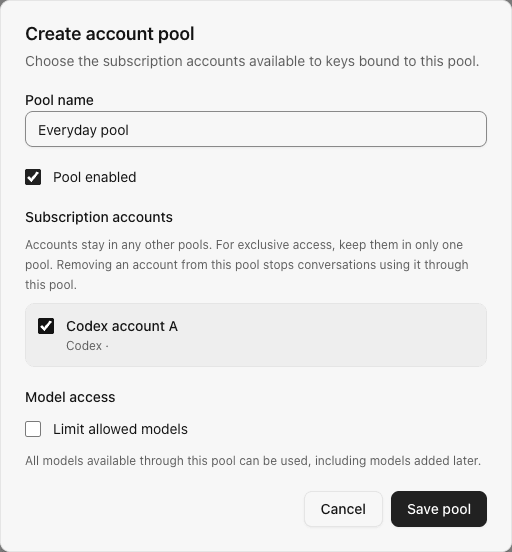
- Open Account pools and select Create account pool.
- Enter
Everyday poolas its name and leave it enabled. - Select Codex account A in the subscription list.
- Leave model restrictions off and save the pool.
Example pool form with sample account data:
Imported accounts are not assigned automatically, and a default pool is not created. This step is required.
Check the result
The pool list should show Everyday pool containing one subscription. Codex account A should no longer be marked Unassigned.
As the administrator, you can use this enabled pool directly. No member grant or allowance scheme is needed. Chapter 6 explains how to give members access.
If the account is missing, return to the previous chapter and confirm it was added. Consult account pool reference later when restricting models or separating pools.
Previous: 2. Connect a subscription
Next: 4. Create a personal key