

System settings
SubLane guide: system settings.
Use this when changing instance settings or investigating a Codex, Grok or Claude version compatibility problem. Defaults are sufficient to begin the setup guide.
The platform owner expands Administration → System settings in the sidebar, then selects Time zone (/admin/settings/timezone), Codex client version (/admin/settings/codex), Grok client version (/admin/settings/grok), or Claude client version (/admin/settings/claude). The previous /admin/settings address redirects to Codex settings. These settings apply to the whole instance; other workspace administrators and members cannot change them. The header's Preferences shortcut remains personal: theme, language and password.
Software updates
Open System settings → Software updates (/admin/settings/updates) to inspect the current build, latest official stable release, release notes and update-job status. Checking releases is separate from installing them and from the provider client-version settings below. Only the platform owner has access, including to the API.
After the host updater is enabled, choose the inspected target version, confirm that a current backup has been exported and verified, and install. The page reports queued/running states and reconnects through the service restart. Completion requires the host readiness check and the target server version; failed/interrupted jobs retain a diagnostic message. Installation is opt-in, supports stable script-managed Linux deployments, and never automatically downgrades a migrated database.
The endpoints are GET /api/settings/updates, POST /api/settings/updates/check (empty JSON), and POST /api/settings/updates/install (version and backup_confirmed: true). Install requests are audited and return HTTP 202 when queued; an existing job returns 409. State-changing requests enforce the same-origin browser boundary.
Instance time zone
The default is UTC. Enter an IANA time zone such as Asia/Shanghai and save it to display timestamps in that zone across workspaces. Each resource allowance chooses a daily reset clock or a monthly date and clock in the selected zone. The default is midnight (the first day for monthly rules). The balance shows the exact next reset time; daylight saving changes are handled by the time zone rules. Minute request limits continue to use fixed sixty-second windows.
The change takes effect immediately. Existing allowance usage is counted from each request's start time within the newly selected window, so changing the zone does not silently clear current usage. Already scheduled allocation revisions keep their previously saved activation timestamp. Operational daily summaries and the hourly activity grid remain grouped by UTC; their UTC labels stay visible. The setting is stored in settings['instance.time_zone'] and audited with the change.
Codex client version
The effective version is chosen in this order:
- An explicit manual version, if configured.
- The last synchronized stable version, provided it is at least the built-in default.
- The built-in default (
0.155.1).
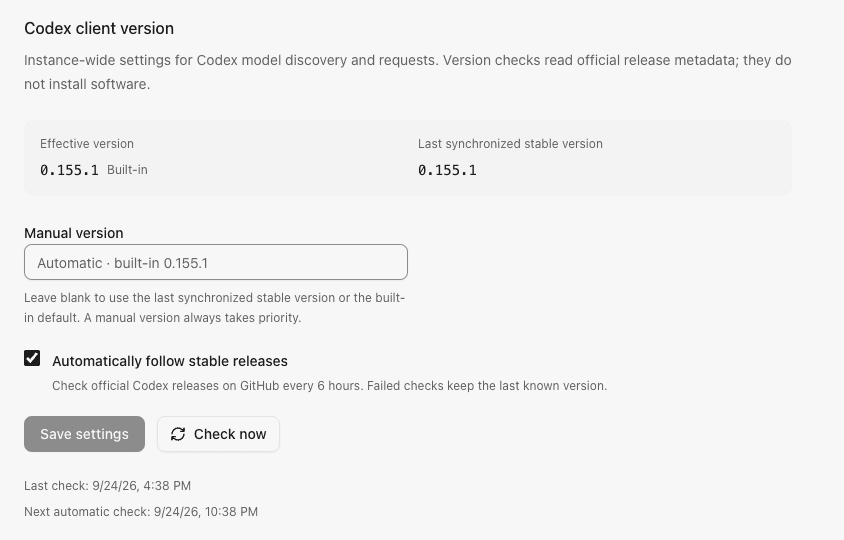
Manual versions use major.minor.patch without a v prefix or prerelease suffix. Clear the input to return to automatic selection. A manual pin may select an older version deliberately; automatic synchronization never lowers the remembered stable version or the built-in baseline. The page shows the effective version, its source, the last synchronized version, and check timestamps.
Automatically follow stable releases is enabled by default. At startup, the service checks if due and otherwise resumes the saved schedule. Successful checks schedule the next attempt six hours later. Failed checks preserve the previous successful version and retry after fifteen minutes, respecting longer upstream rate limits. Turning automatic checks off cancels pending automatic work and keeps the known version. It does not prevent an explicit Check now action or override a manual pin.
Manual checks share an in-flight operation and have a sixty-second cooldown after a completed attempt; upstream rate limits or a storage failure can extend it. Disconnected callers do not cancel shared checks. Shutdown cancels and joins all checks before SQLite closes.
The service reads only the official openai/codex GitHub release metadata. It accepts stable rust-v… tags and excludes drafts and prereleases. The latest-release endpoint has a 2 MiB response bound; if it points to another component, one fallback page is limited to thirty releases and 16 MiB, decoded one release at a time. Checks have a thirty-second deadline, reject redirects, and send no subscription credentials or GitHub token. Network failures, invalid responses and persistence failures retain the prior effective version. No binary is downloaded or installed, and the CLIProxyAPI dependency is unchanged.
Example Codex version settings with sample check times:
Grok client version
Grok has an independent version policy at Administration → System settings → Grok client version. It uses the same selection order, manual override, six-hour automatic schedule, failure retention, cooldown and shutdown behavior described above. Its built-in default is 1.0.50.
Checks read the official @xai-official/grok npm package's latest dist-tag. Alpha tags and prerelease version strings are excluded. The response is limited to 64 KiB, with a thirty-second deadline and redirects rejected. No subscription credentials are sent and no CLI binary or SDK dependency is installed.
The effective version controls x-grok-client-version and the matching User-Agent on Grok subscription inference and billing requests. Older client versions can be rejected by the Grok chat proxy with HTTP 426 even while model discovery or quota reads succeed. If version checks cannot reach npm, use Check now after connectivity recovers or set a manually verified stable version. A manual pin takes priority over later automatic results.
Claude client version
Claude has a separate Claude client version page at /admin/settings/claude, with the same manual overrides, six-hour checks, cooldown, failure retention and restart behavior. Its built-in version is 2.1.287.
Checks read the official @anthropic-ai/claude-code npm package's stable dist-tag. The publisher's latest and next channels can be newer; they are not substitutes when stable is unavailable. Checks have the same 64 KiB response bound and thirty-second deadline as Grok and do not install executables.
Each inference request captures one version. The public SDK generates its User-Agent, body billing cc_version and CCH signing from an immutable configuration for that version. Updating the policy affects new requests while a request already running retains its original version. Model discovery and quota queries also use the selected client identity. The SDK credential store remains empty and version bootstrap listeners are closed immediately.
Opus 5.5 and Sonnet 5.5 use their supported adaptive thinking and effort controls. Chat Completions and Responses preserve explicit output-token limits. OpenAI reasoning_effort: none selects low effort on Opus 5.5, whose thinking is always on; on Sonnet 5.5 it selects between_tools, with no up-front thinking. Native manual thinking budgets and forced tool choices that these models do not support are rejected before provider IO. Native adaptive requests retain their display intent. Version synchronization updates client metadata; future protocol changes can still require adapter changes.
Persistence and request behavior
Independent bounded JSON values at settings['codex.version'], settings['grok.version'], and settings['claude.version'] store each provider's configuration, last successful version and attempt timing. Existing Codex settings retain their original key and behavior. No new table or migration is required. Successful configuration changes and their settings.update audit event commit together. Automatic release observations do not create administrator audit events. The runtime version is published only after persistence succeeds.
Codex model discovery, quota metadata, and forwarding use the effective version. Each discovery request captures it once for the query, headers and persisted source marker. Changing the version invalidates catalog freshness: the next catalog read or model request triggers rediscovery. An in-flight result from a superseded version is discarded. Other providers and administrator model allowlists are unchanged. See model catalogs for stale-data and routing behavior.
Browser API
| Endpoint | Purpose |
|---|---|
GET /api/settings/timezone | Read the instance time zone |
PATCH /api/settings/timezone | Save time_zone as an IANA name |
GET /api/settings/codex | Read configuration, effective version and check state |
PATCH /api/settings/codex | Save both manual_version (string) and auto_sync (boolean) |
POST /api/settings/codex/sync | Check official releases with an empty JSON object |
GET /api/settings/grok | Read Grok configuration, effective version and check state |
PATCH /api/settings/grok | Save both manual_version (string) and auto_sync (boolean) |
POST /api/settings/grok/sync | Check the official npm stable tag with an empty JSON object |
GET /api/settings/claude | Read Claude configuration, effective version and check state |
PATCH /api/settings/claude | Save both manual_version and auto_sync |
POST /api/settings/claude/sync | Check the official npm stable channel with an empty JSON object |
All endpoints require the platform owner session. Mutations also require the exact origin. Invalid versions return 400; check cooldowns return 429 with Retry-After; release or persistence failures return sanitized 503 errors. A reported release version is compatibility metadata, not proof that every account supports every model in that release.
Prometheus metrics
Set a separate, random SUBLANE_METRICS_TOKEN containing 32–128 visible ASCII characters to enable /metrics. Configure the scraper to send Authorization: Bearer <token>; browser sessions, gateway keys and URL query parameters do not authenticate this endpoint. With the setting unset, the endpoint returns 404.
The endpoint exposes process-wide fixed-outcome request counters, duration and observed first-output histograms, active inference leases and queue length. Unknown latency is omitted. Counters survive workspace runtime eviction and reset on process restart; unauthenticated ingress without a gateway observation is excluded. Scrapes read memory only, perform no provider IO or SQL, and include no model/member/account names, content or secrets. Demo mode does not enable metrics.