

Backup and restore
SubLane guide: backup and restore.
Once your instance is in use, create a backup before upgrades or moving servers. First-time client setup is covered in First request.
SubLane can export a running instance, verify a backup, and restore it into a new directory. Both the command line and System settings → Backup and restore use the same archive validation and restore implementation. Recovery never overwrites the running instance; switching to restored data is an explicit operator restart.
What is included
New backups use password-encrypted binary age v1 files (.sublane-backup.tar.gz.age). The encrypted payload is a gzip-compressed tar archive containing exactly:
sublane.db: a consistent SQLite snapshot, including committed WAL data.credentials.key: the matching encryption key for subscription credentials, recoverable gateway keys, webhook/content secrets and TOTP seeds.manifest.json: format version, creation time, SubLane build version, schema version, file sizes and SHA-256 checksums.
Users, password hashes, API keys, subscription accounts, pools, permissions, catalogs, settings, request records, usage summaries, cooldowns and affinity records are included. Browser sessions are captured in the backup but cleared in a restored directory. Browser-local theme/language choices, process environment, deployment files and pending in-memory OAuth attempts are not included.
New exports require a separate password of 12–128 Unicode characters. SubLane does not retain it. Keep the password separately from the archive; losing it prevents recovery of that encrypted backup. Encryption protects the complete archive, including its credential key and manifest. The reader authenticates the entire encrypted stream before publishing restored data.
Historical unencrypted .tar.gz backups remain readable without a password. Verification identifies them as unencrypted even if their manifest claims otherwise. Anyone with such an archive can recover its credentials; keep it private and create an encrypted backup after restoring. Encryption and checksums do not establish the identity of an untrusted backup's author.
Generated archive files use mode 0600, and staging/restored directories use 0700 on Unix. Browser downloads follow the browser and operating system's destination permissions.
Separate credential-key storage
The compatibility default is still <data directory>/credentials.key. Set the optional SUBLANE_CREDENTIALS_KEY_FILE to an independent file outside the data directory. The setting contains a path, not key material. Startup and CLI exports reject configured paths inside the data directory, including directory symlink and case aliases. Newly generated key files remain private regular 32-byte files with mode 0600.
For an initialized instance, stop SubLane and copy its existing key to the independent private location before enabling the setting. Set ownership for the service user, start with the new setting, and verify startup and an encrypted backup. Only then remove the old copy from the data directory. Never replace an existing instance's key with a newly generated one; missing keys for existing encrypted records fail closed.
SUBLANE_DATA_DIR=/srv/sublane/data \
SUBLANE_CREDENTIALS_KEY_FILE=/srv/sublane-secrets/credentials.key \
./bin/sublane
CLI export also accepts --key-file FILE, overriding the environment setting. Export reads the original key directly into the encrypted archive; it does not create a plaintext key copy in export staging. A separate location reduces the impact of copying the data directory, but cannot protect against an attacker who fully controls the application process or host.
Automated Compose migration
The application repository provides scripts/separate-key.sh for existing SubLane v0.12.0+ Compose deployments. Save and inspect the script before running it on the Docker host. Export and verify a password-encrypted recovery backup first.
sudo bash scripts/separate-key.sh --dir /srv/sublane --key-dir /srv/sublane-secrets--dir identifies the existing deployment containing docker.compose.yaml and its optional .env. --key-dir must be a new absolute persistent host directory, with an existing parent, outside the actual data mount and the recovery directory. Ordinary ASCII paths including spaces are supported. The helper requires local Linux rootful Docker without user-namespace remapping or SELinux, Compose, Bash, jq and GNU coreutils. The healthy service must be named sublane, its data directory must be a writable bind or named-volume mount root, and the Compose file must use conventional two-space service indentation, a block environment mapping and a block volumes list. Unsupported layouts fail before stopping the service.
The helper checks the current project, image, data mount, private 32-byte key and key digest. It preserves Compose text and variable interpolation, and compares Compose's canonical configuration before applying the change. The new host directory stays root-owned with mode 0700; only its 0600 key file is mounted read-only into the container, owned by the service UID/GID. The running service's permissions are not elevated.
Before switching, after switching and after removing the old key, it creates and verifies a temporary encrypted backup using a fresh random password. Verification scratch is outside the data directory and is removed afterward; allow sufficient disk space and the backup KDF's memory cost. These checks do not leave a retained recovery backup. The old data-directory key is removed only after the new configuration, health, key digest and credential validation pass; another recreation and credential check confirms independence from that old file.
Catchable errors and signals after switching begins attempt rollback. To roll back explicitly, including after a successful migration:
sudo bash scripts/separate-key.sh --dir /srv/sublane --rollbackPrivate recovery records remain in /srv/sublane/.key-migration. Rollback restores the original configuration and matching key, then recreates and verifies the original service. It refuses to overwrite unrelated configuration/environment changes or a different key and never downgrades an image or database. The external key and recovery records remain private after rollback; a new migration refuses to overwrite existing records or destinations. Archive verified recovery records and choose a new key directory before retrying.
The helper shares the installer's .update-lock; run no other deployment operations concurrently. After a forced kill or power interruption, confirm no migration/update is running, remove only the stale empty .update-lock, then use --rollback. If rollback cannot be verified, the helper retains recovery key material and a private operation.log; preserve both the recovery and external-key directories until recovery is complete. Retained archives and their passwords remain your separate responsibility.
Command line
Prepare a private, single-line password file (mode 0600), preferably using a password manager. The examples read it through --password-stdin; passwords are never command-line arguments or environment variables. Run from a directory with enough free space for the database snapshot and encrypted archive:
mkdir -p backups
./bin/sublane backup --password-stdin --output ./backups/team.sublane-backup.tar.gz.age < /secure/backup-password
./bin/sublane backup verify --password-stdin --input ./backups/team.sublane-backup.tar.gz.age < /secure/backup-password
./bin/sublane restore --password-stdin --input ./backups/team.sublane-backup.tar.gz.age --data-dir ./data-restored < /secure/backup-password
backup reads SUBLANE_DATA_DIR or ./data, with optional --data-dir and --key-file overrides. Legacy plaintext verify/restore commands can omit --password-stdin. restore always requires an explicit new directory; even an existing empty directory is rejected. The parent directory must exist. Existing archive files and restore directories are never replaced. Successful commands print a JSON result with the operation, path and backup metadata. sublane --help lists the commands.
Maintenance commands do not start the HTTP server, SDK executors, OAuth, or automatic release checks, and do not depend on server address/public-URL configuration. They have a fifteen-minute deadline and respond to SIGINT/SIGTERM. Database snapshots are limited to 4 GiB and archive IO uses bounded buffers. Allow disk space for extraction and migrations when verifying or restoring, in addition to the archive itself.
After a successful restore:
- Stop the current SubLane service.
- Keep its original data directory intact.
- If using an external credential key, move the restored
credentials.keyto a new private location outside that directory and pointSUBLANE_CREDENTIALS_KEY_FILEat it. Do not overwrite the running instance’s key. Otherwise retain the compatibility default. - Start SubLane with the restored directory and its matching key configuration:
SUBLANE_DATA_DIR=./data-restored ./bin/sublane- Sign in again and check the expected users, pools, keys and account states before resuming team traffic.
The original directory is available for rollback by stopping SubLane and switching SUBLANE_DATA_DIR back. Do not run two gateway instances against the same data directory. Restoring rolls back all stored state to the snapshot: later key revocations, password changes and new records are not included. A subscription provider may have invalidated older refresh tokens since the backup; reauthorize affected accounts when necessary. Verification checks decryption and local integrity without contacting providers.
Web interface
Only enabled administrators can use the page or its endpoints. Mutations require the exact browser origin, and export rechecks the administrator session after preparing the file.
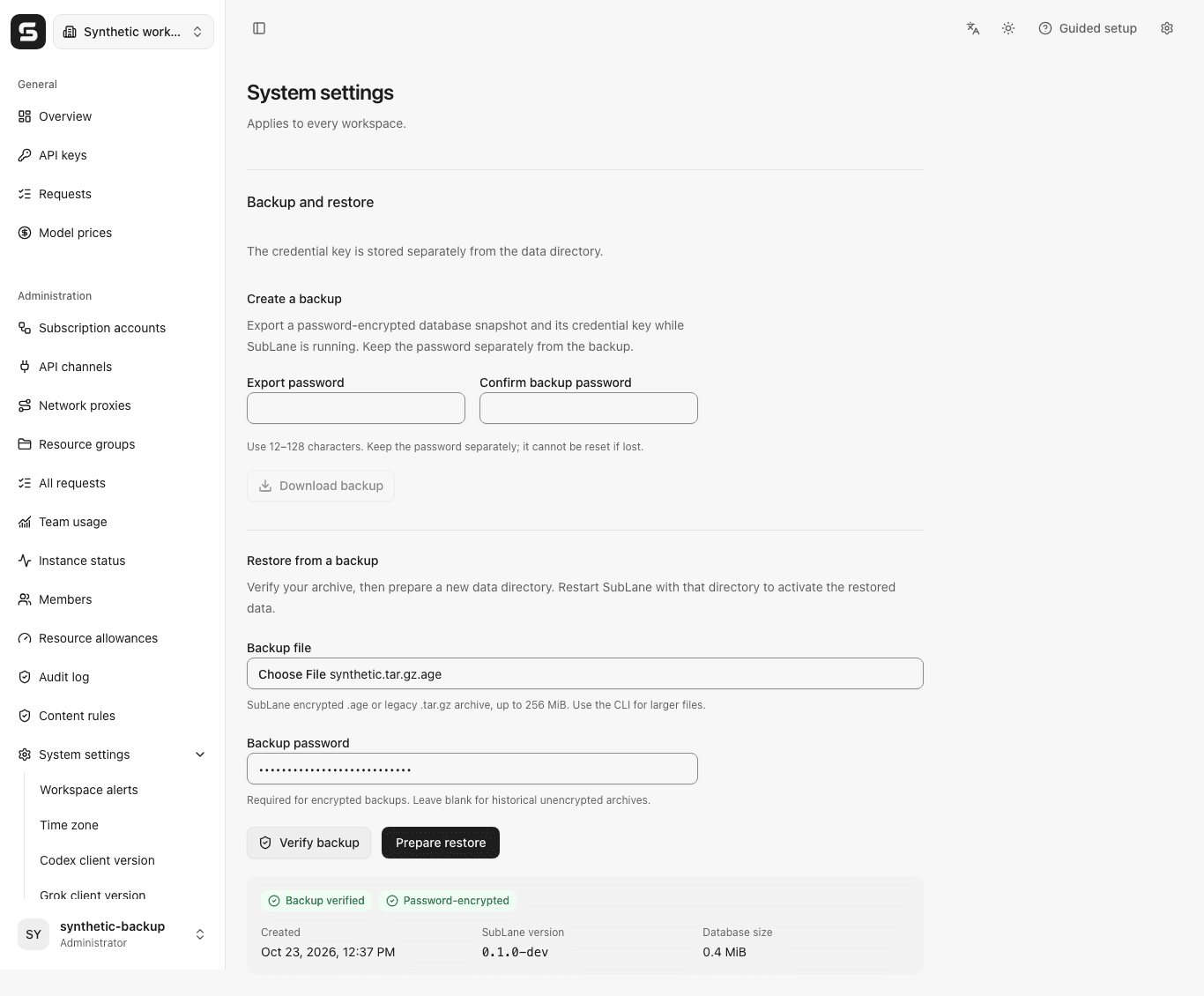
- Download backup requires a password and confirmation, then creates and downloads an encrypted archive while the instance remains available.
- Verify backup accepts the selected archive and its password in a multipart request body. It displays creation time, SubLane version, database size and whether the archive was encrypted. Changing the password or file invalidates earlier verification.
- Prepare restore uploads and validates the file again, then creates
<current data directory>/restore-ready. The page shows the full path and restart instructions, including the external-key step when configured. The current instance keeps running with its original data until the operator switches directories.
An existing restore-ready path blocks another preparation. Inspect it on the server or use the CLI with a different new target. No directory can be overwritten through the web API. If recovery data was prepared but the live audit write failed, the directory is retained and the page reports the audit failure; inspect it before retrying.
Web uploads and downloads are limited to 256 MiB per archive; larger backups require the CLI. One export/verification/restore operation runs at a time per server. Upload, processing and download have bounded deadlines. Temporary files are removed after completion, failure or normal cancellation. A forced process kill or power loss may leave a private .sublane-backup-* directory; remove leftover staging directories only when no backup operation is running.
Exports and prepared restores are audited without recording archive contents, filenames, filesystem paths or credentials. Downloads use Cache-Control: no-store. The page streams uploads from the selected file; the browser receives the downloaded archive as a temporary blob and releases its URL after starting the download.
Example browser backup and restore controls:
Docker Compose
For separate keys, mount an independent private directory using a local override and set the path inside the container. Ensure it is owned by the image’s sublane user (docker compose exec sublane id shows its IDs); keep directory mode 0700 and key mode 0600. Existing installations must copy the matching key before switching. Once a matching key exists, the mount can be read-only.
services:
  sublane:
    environment:
      SUBLANE_CREDENTIALS_KEY_FILE: /run/sublane-keys/credentials.key
    volumes:
      - type: bind
        source: /srv/sublane-secrets
        target: /run/sublane-keys
To export and verify within the running container:
docker compose -f docker.compose.yaml exec sublane sh -c 'mkdir -p /data/backups'
docker compose -f docker.compose.yaml exec -T sublane sublane backup --password-stdin --output /data/backups/team.sublane-backup.tar.gz.age < /secure/backup-password
docker compose -f docker.compose.yaml exec -T sublane sublane backup verify --password-stdin --input /data/backups/team.sublane-backup.tar.gz.age < /secure/backup-password
docker compose -f docker.compose.yaml cp sublane:/data/backups/team.sublane-backup.tar.gz.age ./team.sublane-backup.tar.gz.age
For recovery, copy a backup into a private writable location visible inside the container, then prepare a separate directory:
docker compose -f docker.compose.yaml exec -T sublane sublane restore --password-stdin --input /data/backups/team.sublane-backup.tar.gz.age --data-dir /data/restore-ready < /secure/backup-passwordThe web restore action produces the same target. With external keys, move the recovered key to a new independent location and update its mount/path before activating the restored directory. To activate it, create a local Compose override, for example docker.compose.restore.yaml:
services:
  sublane:
    environment:
      SUBLANE_DATA_DIR: /data/restore-ready
Then stop the original process and start with the override:
docker compose -f docker.compose.yaml stop sublane
docker compose -f docker.compose.yaml -f docker.compose.restore.yaml up -d
For an already stopped container, use docker compose -f docker.compose.yaml run --rm --no-deps sublane ... instead of exec to run maintenance commands against its named data volume. Keep the selected override in subsequent deployment commands. Do not remove the named volume during this procedure.
Validation and failure behavior
The age password recipient uses scrypt work factor 18 (approximately 256 MiB for derivation). Imported files cannot request a higher work factor. This is a per-operation cost, not a whole-process memory guarantee. Wrong passwords, tampering, truncation and trailing encrypted content fail before restored data is published. Interrupted operations clean up private staging during normal cancellation; a forced process termination may leave private staging that needs operator cleanup.
Verification checks exact archive entries and sizes, SHA-256 digests, gzip integrity, the supported consolidated schema version, SQLite integrity and foreign keys, bounded credential records, and decryption of account credentials and encrypted API keys. Validation connections also cap individual SQLite values and SQL statements at 1 MiB. Symlinks, path traversal, duplicate/unexpected files, missing files, truncated archives and unknown future schemas are rejected. Older development schemas are not accepted by this prerelease build.
Restore closes and synchronizes its prepared database/key before publishing the entire new directory with an atomic no-replace operation. Linux and macOS require filesystem support for that operation; an unsupported operation fails without falling back to an overwrite. No extra database table or schema migration is introduced by backup support. SQLite snapshot creation uses the SQLite Online Backup API through the pinned Go driver, rather than copying a live database file.
| Endpoint | Purpose |
|---|---|
GET /api/settings/backup | Read the web size limit and fixed restore destination |
POST /api/settings/backup/export | JSON {password}; return a password-encrypted binary attachment |
POST /api/settings/backup/verify | Multipart password + file (or legacy raw gzip); return verified metadata |
POST /api/settings/backup/restore | Multipart password + file (or legacy raw gzip); prepare a new directory |
The UI sends multipart/form-data with a bounded password field before the file part. Passwords never appear in URLs or headers. Historical raw gzip/octet-stream uploads remain accepted without a password. New downloads use application/octet-stream. Missing/invalid passwords, decryption failures and invalid archives return 400, an existing destination returns 409, oversized uploads return 413, and an occupied operation slot returns 429 with Retry-After. Storage and other operational failures return sanitized 503 errors.
Automatic encrypted backups
Enable scheduled backups with the deployment settings below. The destination must be private (0700), and the password must be in a private regular file (0600, no symlink), separate from the data and backup directories. Keep the independent 12–128 character password separately; SubLane rereads it for every run.
export SUBLANE_BACKUP_DIR=/srv/sublane-backups
export SUBLANE_BACKUP_PASSWORD_FILE=/secure/sublane/backup-password
export SUBLANE_BACKUP_INTERVAL=24h
export SUBLANE_BACKUP_KEEP=7
A backup runs at startup, then the interval starts after each attempt. Archives are fully verified before rotating reserved scheduled- filenames; manual archives and the new verified archive are preserved. Success and failure are recorded in service logs. This version has no remote upload or browser scheduling form. Demo mode does not run backups.
SUBLANE_BACKUP_INTERVAL: 1h–720h (default 24h). SUBLANE_BACKUP_KEEP: 1–365 (default 7).
Use a dedicated backup destination for each instance.
Set optional SUBLANE_BACKUP_WEBHOOK_URL to a public HTTPS destination for one bounded backup_failure JSON event on each failed attempt. This is an instance-level operator destination, separate from workspace alerts; delivery failures are logged.
For Docker, use container paths and mount the private password file and writable dedicated backup directory through a local Compose override. Give the service user access. The default /tmp tmpfs is 64 MiB; larger verification staging needs a separate private writable mount and TMPDIR in the override.