

Resource group runtime
SubLane guide: resource group runtime.
Use this to investigate busy accounts, cooldowns or conversation routing. For a first look at a failed call, start with Everyday use.
SubLane tracks model-request leases and transient account failures across every pool sharing an account. The administrator can inspect scheduling state from Accounts, change a per-account limit through Scheduling settings, and inspect all completed calls under Administration → All requests. Every signed-in user, including the administrator, has a personal General → Requests view.
Admission and affinity
New accounts default to 30 simultaneous model requests, configurable from 1 to 1,000. Upgrades preserve saved account limits. This is local gateway capacity, not a provider guarantee. Workspace capacity defaults to 128 operations, including waiters and shared metadata reads, and can be configured at startup. Member concurrency defaults to 10 and can be set from 0 to 1,000; 0 removes the member limit. Account leases stay held until body closure across HTTP/SSE, compaction and WebSocket turns. Lowering a limit allows existing requests to finish.
An idle conversation or an open WebSocket connection consumes no model-request slot between turns. A completed response releases its slot when the body closes. After a client cancellation, a Codex stream may continue reading for up to three seconds to collect final usage before releasing its slot; the configurable total request deadline (30 minutes by default) and process shutdown still apply. If the client leaves a request running without sending cancellation, that request retains its slot until it ends or reaches the request deadline.
A bound conversation keeps its account. A client-initiated change to a different model with complete portable history can select a supporting account when the current account cannot serve it; model routing describes the continuation restrictions. Capacity and health changes alone never move a binding. When capacity is full, a new request waits up to 30 seconds by default, with at most 100 waiting requests per pool by default. A released account slot or an increased concurrency limit wakes waiting requests. A full queue returns HTTP 429 account_queue_full; an expired wait returns HTTP 429 account_wait_timeout, both with Retry-After: 1. Waiting and these local rejections do not interrupt active streams or penalize upstream account health.
Waiting requests count toward the member concurrency and workspace admission limits and consume the member RPM allowance once. They do not reserve allowance or consume an account slot until admitted. Group access, model policy, member enablement, key enablement/revocation/expiry, account health, subscription quota and allowance are checked again before dispatch. Client cancellation and service shutdown remove waiting requests promptly. Waiting releases the admission lock and holds no database transaction; completed usage is recorded before a released slot becomes available to another request.
Cooldown returns HTTP 429 account_cooling with a bounded Retry-After header and is not queued. No request automatically switches an existing conversation to another account. A sessionless or new conversation can use another eligible account immediately; a bound conversation waits only for its original account. Subscription quota exhaustion, member/workspace limits and allowance admission errors retain their normal guards.
Without Session_id or a nonempty prompt_cache_key, every call gets independent selection and a random upstream correlation ID. It does not read or create an affinity entry. New native selections rotate within each pool among eligible subscription accounts supporting the model. Explicit legacy prefixes limit selection to their provider. Existing explicit default-group conversations retain their historical digest.
The limit covers model requests; account verification, model discovery, and quota reads remain bounded by the existing global admission policy and do not consume model-request slots. These metadata operations do not clear model-request cooldowns.
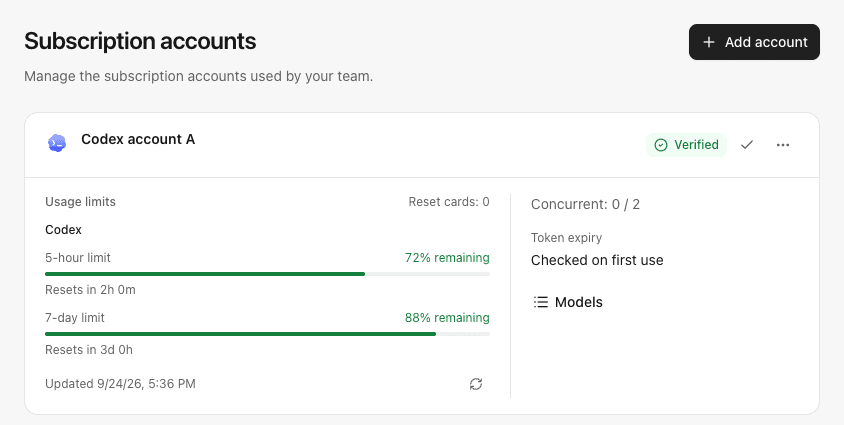
Example account scheduling and subscription quota view with synthetic values:
Cooldown and recovery
Account-wide cooling is reserved for upstream 429 responses. Retry-After is honored within 1–3600 seconds; when absent or invalid, the configurable fallback defaults to 5 seconds. Credential refresh failures have their own backoff. Request deadlines, HTTP 408 and unknown network failures do not cool the whole account.
Explicit upstream 5xx responses and invalid/interrupted streams are counted for the selected account and model. The default threshold is three logical failures within two minutes, followed by a 10-second model cooldown. Repeated failures increase the delay up to five minutes. The threshold, window and initial duration are configurable; a threshold of 0 disables transient model cooldowns. Other models remain eligible. Successful ordinary recovery requests clear the applicable state; late results cannot clear newer failures. Existing structured Antigravity model rate limits retain their scoped recovery rules.
Before accepting a successful upstream response, explicit HTTP 408, 500, 502, 503 and 504 rejections may be retried twice on the same account, with bounded backoff. Retries recheck current membership, key, group/model policy, quota, account lifecycle and content rules. They retain one lease, request ID, history record and final settlement. Long upstream retry hints are returned instead of replayed early. Network uncertainty, 400/401/403/429, accepted streams and partial output are not automatically replayed by this mechanism. The existing explicit 401 credential-refresh attempt remains separate.
HTTP SSE emits comment heartbeats every 10 seconds while upstream event reads continue. An optional stream idle timeout counts upstream events only; downstream heartbeats cannot hide a stalled model. It defaults to off. Inference header timeout defaults to five minutes, metadata keeps its shorter timeout, and the total request/turn timeout defaults to 30 minutes. See deployment configuration.
Administrators can clear cooldowns without enabling an account, renewing authorization or restoring subscription quota. Existing conversations keep their original account. Account/model cooldowns survive restart. Upgrading clears legacy account-wide transient penalties whose model scope was unknown, while preserving actual rate limits.
Credential refresh and recovery
Codex credentials are refreshed on demand within two minutes of expiry. If that refresh temporarily fails, requests may continue with the existing access token only while it has more than 30 seconds remaining and has not been rejected by the upstream. Expiry is checked again after the refresh attempt. Claude and Antigravity retain their existing validity requirements.
Failed refresh attempts share an account-specific retry delay: 30 seconds, one minute, two minutes, four minutes, then at most five minutes. A longer OAuth Retry-After is respected, up to one hour. Once the delay expires, the next credential read or model request can retry; there is no additional background polling loop. Other accounts retain their own retry schedules.
If no usable token remains, model requests return 503 account_refresh_failed with Retry-After. Refresh failures do not accumulate model-call cooldown penalties. Successful refresh or reauthorization clears the refresh retry state. Retry delays are process-local, while an upstream rejection is stored with the encrypted credential so restarting cannot make that token eligible for fallback again.
The Codex token endpoint must return an explicit credential failure, such as invalid_grant or refresh_token_reused, to require reauthorization. An unknown HTTP 400/401, proxy response, or shared OAuth client configuration error alone does not mark an account as needing reauthorization. A refreshed token that is still rejected by the model endpoint continues to require reauthorization. Existing conversations keep their account binding throughout recovery.
Quota-aware selection
Codex, Claude and Antigravity model traffic starts shared background quota refreshes for eligible pool accounts, without waiting for provider IO. At most two quota reads run concurrently within the workspace admission slots; duplicate reads coalesce, and existing cooldown/backoff rules apply. There is no general idle polling loop. Managed share resources additionally run bounded retries after request completion to reconcile waiting usage, including after the last request; see reconciliation and pauses. Claude main windows can exclude an exhausted account. Antigravity checks only the exact requested native model, with SDK thinking suffixes normalized; other models remain eligible and account-wide runtime state stays available.
For Codex and Claude, selection reads the persisted normalized main subscription limit in the same short transaction as pool policy and affinity. An explicit denial, a reached-limit flag, or a window at 100% used excludes the account from new selection only while the observation is fresh (two minutes, shortened by a reset). Unknown, stale, future-dated or already-reset data does not mean zero quota. Additional named limits are not assumed to map to models and cannot exclude an entire account. Low-but-positive quota does not alter round-robin weights. A failed refresh retains the last successful observation; it can affect scheduling only until its original freshness deadline, never indefinitely.
A bound conversation whose account or requested Antigravity model is exhausted returns HTTP 403 quota_exhausted. The provider is checked again after the snapshot freshness/reset deadline; reaching that time is not a promise that allowance has recovered. It never moves to another account. Quota rejection does not increase transient failures, and Clear cooldown does not erase subscription quota. Accounts show a distinct quota-exhausted scheduling state.
Successful observations are saved before publication and survive restart. Quota rows carry the existing account lifecycle revision; disable/enable and reauthorization invalidate prior observations, and conditional writes reject older in-flight refreshes. The consolidated schema stores lifecycle revision metadata with quota rows and request diagnostics.
Quota usage pace
Quota rows show how usage compares with an even pace through the reported window, when the snapshot is fresh and its duration and reset time are known. For example, 70% used halfway through a window is 20 percentage points ahead of an even pace. The comparison uses the last observation time; elapsed browser time never makes an old reading look better.
Open the pace disclosure for its meaning. Stale or failed observations, passed resets and incomplete windows hide pace. Provider windows may roll or reset, so this is a reference rather than a forecast of exhaustion. It does not alter quota admission or account scheduling.
Recent request records
Records cover authenticated model attempts that reach gateway scheduling, including account-capacity/cooldown rejection. Authentication failures, HTTP body/content-type validation failures, global admission rejection, model discovery, quota queries, and WebSocket prewarm do not create model-call records.
Stored metadata is limited to user/key/pool/account IDs, provider, a bounded model identifier, protocol/operation, start time, duration, request correlation ID, nullable first output latency, outcome, sanitized error code, upstream HTTP status, and reported input/output/cached token counts. Prompts, response bodies, raw provider errors, headers, IP addresses, session identifiers and credentials are not recorded. Missing token counts remain null. Counts describe individual observed responses; they are not billing or the resource allowance ledger. Independent daily summaries and member request limits are described in team controls. A stream may have HTTP 200 yet finish with an error, so outcome and upstream status are distinct.
Personal records are filtered by the authenticated session user in SQL before pagination; a client-supplied user ID or scope cannot expand access. Subscription account IDs and names are cleared in the personal API response. Users can filter their own history by outcome, exact model, API key, request ID and time interval, including calls through keys that were subsequently revoked. Administrators can separately filter by member and subscription account. Caller options derive only from retained history inside the same ownership scope. Both views are paginated in batches of 50. At most 5,000 records are retained in a seven-day window. Cleanup runs atomically when recording, and on reading the history; idle data is reclaimed on the next such operation. Monotonic record IDs are not reused after retention cleanup. Deleted account names render as deleted, without deleting historical metadata.
Personal and administrator request tables show an input-token cache hit rate beside the cached-token count: cached input tokens divided by total input tokens, formatted as a percentage with at most one decimal place. This measures the share of input tokens served from the upstream cache, not the share of requests that hit a cache. A reported zero cache count with positive input shows 0%; missing counts, zero input or a cache count exceeding total input show an em dash. The rate is derived from existing request metadata and adds no stored column or upstream request.
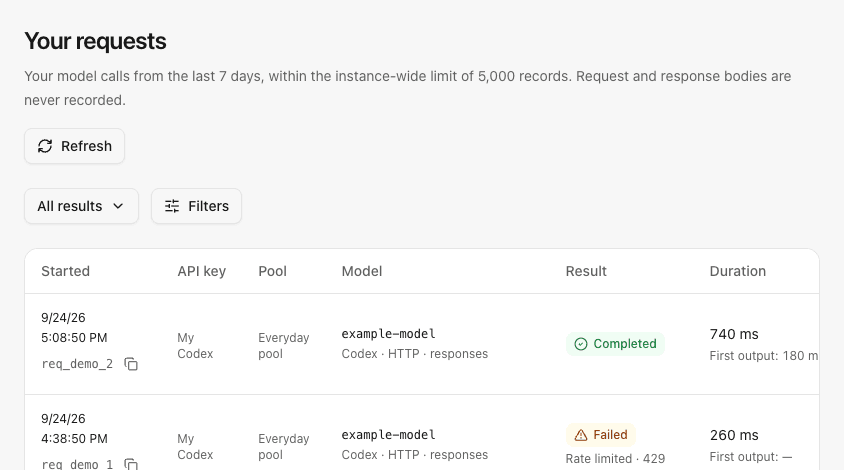
Each new model attempt receives a server-generated req_… identifier, ignoring caller-supplied IDs. HTTP responses return it in X-Request-ID; WebSocket turns add request_id to created/completed/incomplete events and gateway errors. The upstream response ID is unchanged. Records from before the upgrade have no correlation ID or first-output measurement. The request table shows a compact ID beneath each start time with a copy action for the complete value. Clicking the start time opens its details with the full ID.
first_token_ms measures gateway processing start to the first nonempty normalized text, reasoning, reasoning-summary or tool-argument delta, including scheduling and upstream waiting. It is not time to the first lifecycle event or client-rendered token. Compaction, streams without an observed delta and older records keep null; the UI calls it First output. Total duration still covers body closure.
Example personal request diagnostics with synthetic records:
Recorded routing explanations
Open a request's start time to see its recorded final routing attempt. The explanation identifies a retained conversation binding, parent preference, ordinary rotation or quota-weighted rotation, with the final candidate count and nonzero aggregate exclusions for model support, policy, quota, cooldown, capacity or unavailable resources. It describes the decision when the request ran, rather than the resources' current state.
Older records and requests rejected before routing have no recorded explanation. Personal history keeps subscription identities hidden; explanations contain no candidate identities, credentials, prompts or responses. A successful selection does not guarantee that generation completed successfully, and existing conversation bindings remain unchanged.
API and storage
GET /api/accounts/runtime: current scheduling state and model-request counts.PATCH /api/accounts/{id}/limits: setmax_concurrency(integer 1–1,000).POST /api/accounts/{id}/resume: explicitly clear cooldown/failures.GET /api/me/requests?cursor=0&outcome=: current user’s request metadata, for either enabled role.GET /api/requests?cursor=0&account_id=&outcome=: administrator request metadata; outcome may be success, incomplete, error, canceled, or rejected.
Both history endpoints also accept model, request_id, key_id, from (inclusive Unix seconds) and until (exclusive Unix seconds); the administrator endpoint accepts user_id. Retention remains seven days regardless of the requested range. GET /api/me/requests/filters and administrator-only GET /api/requests/filters return bounded caller/key choices with no subscription identity or secret values.
Except for the explicitly personal history endpoints, these routes require an enabled administrator session; mutations retain origin/JSON protections. The consolidated schema creates workspace-scoped runtime and history tables. Back up the stopped database and credentials.key together before replacing a development installation.
Model-specific limits
Explicit structured Antigravity rate-limit responses are narrowed only when the error domain, reason and model match the selected request. Unknown 429 responses retain account-wide cooldown. Model limits persist across restart and belong to the current account lifecycle; reauthorization, disable/enable and manual cooldown clearing invalidate prior state.
A limited model returns 429 model_cooling; the original provider limit is reported as 429 model_rate_limited. Both preserve bounded retry hints. Other models remain usable, and existing conversations retain their original account binding. After cooldown, at most one normal request for that model attempts recovery at a time; no extra inference probe is sent. Older or unrelated successes cannot erase a newer limit. A failed persistence attempt retains the restriction in the current process and is logged as a persistence failure.
Account cards display a limited-model count while overall account scheduling remains available. Scheduling settings → Clear cooldown clears account and model cooldowns, without changing enablement, authorization or subscription quota. Upstream HTTP 403 is reported as upstream_forbidden, rather than a request to reauthorize.
Codex approval reviews
For codex-auto-review requests identified as guardian or review, consistent parent-thread metadata can prefer the parent conversation's account within the same authenticated user and resource group. An existing child binding takes precedence. The preferred account must still pass model support, permissions, quota, allowance and capacity checks. Missing, conflicting, ambiguous, expired or unavailable parents fall back to normal scheduling without changing the parent's binding. Parent and review session/cache identifiers remain separate. Synthetic HTTP and WebSocket tests cover routing; live Codex-client acceptance remains unverified.
Quota-weighted new conversations
Optional SUBLANE_GATEWAY_QUOTA_WEIGHTED=true enables rotation proportional to the most constrained remaining quota percentage. It applies only within the winning preference tier when every candidate has fresh numeric windows from the same supported provider; Antigravity uses the exact requested model. Unknown, stale, partial or mixed-provider observations retain equal rotation.
This setting defaults to off and requires restart. Existing conversations, parent-account preferences, model permissions, allowances and concurrency checks remain authoritative. Percentages are a scheduling heuristic and do not represent comparable absolute plan capacity.