

Team controls
SubLane guide: team controls.
For request and usage checks, start with Everyday use. Use this reference for password recovery, request limits and detailed statistics. Free shared access needs no extra limit configuration.
Password lifecycle
Both roles can open Preferences → Change password. The current password is required; the new password must contain 8–20 Unicode characters. The platform administrator in the first workspace can open Members → More actions → Reset password for a member, including a disabled member. Resetting a disabled member does not enable that account.
Every successful change atomically replaces the Argon2id hash and revokes all browser sessions for that user, including the current session. Other users remain signed in. Regular password changes and remote member resets preserve enrolled TOTP and passkeys. Password verification and session creation recheck the same hash, so a login that verified an old password cannot create a session after a concurrent reset. Password mutations retain same-origin/JSON checks, the existing peer/global authentication throttle, and the bounded hashing worker count.
Gateway API keys have an independent lifecycle and remain valid. Revoke affected keys separately if necessary; disabling a member continues to suspend all of their keys. No password or hash is returned by the management API or stored in browser storage. Closing a password form discards its pending mutation data.
If the administrator cannot sign in, use the local recovery command. Stop the instance and back up its database and credentials.key together first. Point SUBLANE_DATA_DIR at the existing instance and supply the new password through standard input, for example from a private file:
SUBLANE_DATA_DIR=/path/to/data ./bin/sublane reset-admin-password --password-stdin < /secure/path/new-passwordKeep the input file readable only by its owner and remove it after use. The command accepts one line, never takes a password in command-line arguments, rejects direct terminal input, and never prints the password. It requires an existing database and administrator, checks the supported database schema, revokes administrator browser sessions, and clears the administrator’s TOTP, recovery codes and passkeys. It does not start an HTTP server, initialize a new administrator, change gateway keys, or modify subscription credentials. There is no public recovery endpoint.
Member request limits
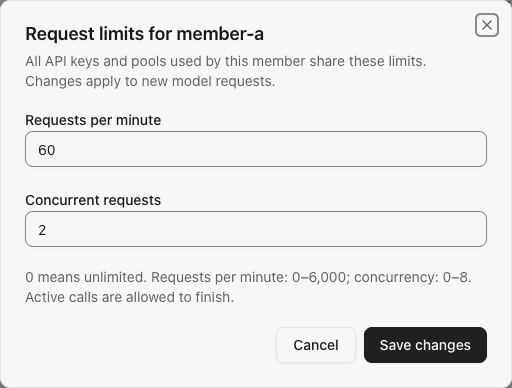
Administrators open Members → More actions → Request limits. Requests per minute default to 0 (unlimited), and member concurrency defaults to 10. Setting either limit to 0 disables that personal limit. Membership limits apply to every role; shared workspace/account capacity still applies. Upgrades preserve existing saved limits.
| Setting | Accepted values | Scope |
|---|---|---|
| Requests per minute | 0–6,000; 0 disables this limit | All of a member's API keys, providers and pools |
| Concurrent requests | 0–1,000; 0 disables this limit | All active model requests for the member |
The rate limit uses fixed UTC minute boundaries. A boundary can admit requests from each of the adjacent windows in quick succession; this is not a sliding-window limit. A request consumes one rate slot after validation and member concurrency admission, before upstream account selection. An unavailable account, cooldown or later provider failure still consumes that slot. Requests already rejected by member concurrency or rate admission do not consume another rate slot. Model discovery, subscription quota reads, and local WebSocket prewarm do not consume model-request limits.
HTTP/SSE, Chat Completions, compaction and each WebSocket model turn use the same admission path. Upstream retries within one logical request do not consume extra slots. Member leases remain active until the existing response lifecycle closes, and release exactly once on normal completion, cancellation, failure or shutdown. Changes apply to subsequent requests; lowering a concurrency limit lets admitted calls finish. Shared gateway and account limits still apply even when personal limits are disabled.
HTTP limit rejections return 429 with member_busy or member_rate_limited and a bounded Retry-After header. WebSocket turns return a corresponding error event. Local rejection never penalizes an upstream account. Policies and minute counters are persisted in SQLite. In-flight counters are process-local and empty after restart; run one SubLane process per database.
Example per-member request limits with synthetic values:
Resource allowances
After creating a dedicated resource group and granting members access, open Resource allowances → Add resource allowance. Choose By share, By amount, By tokens or By time window. Share mode divides a configured token or internal USD budget; time-window mode applies several duration-based USD limits. Owners and administrators need no direct group grant. All of a member's keys bound to the same allowance share its balance. See resource allowances for setup and reset rules.
Upgrade note: Former standard-key token budgets no longer limit requests. To keep a token limit, create a resource allowance and a new key bound to it. Existing budget rows remain in upgraded databases, but the app no longer reads or updates them. Usage during this version is not added to those old counters if you roll back.
Usage summaries
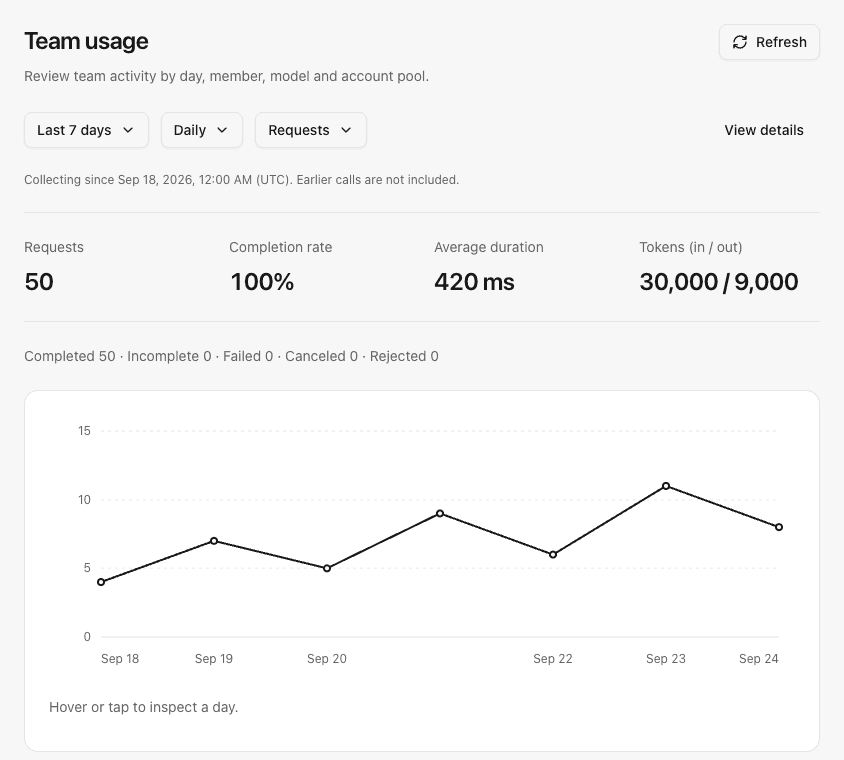
General → Overview → Your usage shows the current user's calls and current personal limits. Administration → Team usage shows the selected workspace. Choose today or the last 7, 30 or 90 UTC calendar days, including the current partial day. Summaries include request counts, outcome counts, completion rate, average duration, and reported input/output tokens. Daily, model and pool breakdowns are available to both roles; the team view also includes members. Non-daily breakdowns show the top 20 entries by request count, while totals always cover the entire selected period. Daily trends use an interactive line chart; model, pool and member comparisons use horizontal bars. Switch between requests, input tokens and output tokens, and expand View details for exact tabular values. Token gaps stay unknown rather than being plotted as zero. Daily points support pointer/touch inspection and arrow-key navigation.
Completion rate is completed requests divided by all recorded attempts; incomplete responses have a separate count. Average duration includes local rejection, cancellation and failure. Missing token reports remain unknown, and partial sums are explicitly labeled. Cached-token counters are also retained by the API. These are operational statistics. Enforceable resource allowances use a separate ledger; summary totals are not a bill or the remaining allowance.
Coverage starts when statistics collection begins in the initialized database, and the interface displays that timestamp. Existing request records are not backfilled because retained history may already be incomplete. Attempts share the request-history coverage boundary: authentication failures, HTTP validation failures before gateway entry, global admission rejection, metadata queries and prewarm are excluded. Member-limit rejections inside gateway scheduling are included.
Aggregates are stored independently of recent request records in UTC daily buckets by user, pool, provider and normalized model. At most 64 distinct model labels are kept per user per day; additional labels are grouped as Other models without dropping counts or reported tokens. Model aliases with and without the Codex prefix share one label. No prompt, response, raw provider error, credential, IP address or session identifier is stored.
Aggregates are retained for 90 calendar days. Cleanup runs when recording or reading summaries, so an idle database is reclaimed on the next operation. Aggregate and request-record writes commit together, and each summary read uses one database snapshot. A storage failure is logged and neither write is reported as successfully persisted. Personal filtering occurs in SQL using the authenticated session identity; a supplied user ID or scope cannot expand access. No subscription account identity appears in summaries.
Example administrator usage summary with synthetic totals:
Hourly activity heatmap
Both the personal usage section on Overview and the Team usage page place Activity by time beneath the primary chart and above optional detail rows. The seven rows represent Monday–Sunday and the 24 columns represent UTC hours. Colors reflect the current request/input-token/output-token metric summed over matching weekday/hour slots in the selected period. Changing the primary breakdown does not change the heatmap's personal/team scope.
Hourly aggregates use request start time and are recorded when the model attempt finishes, in the same transaction as daily aggregates and recent history. They contain only user ID, UTC hour, request count, reported input/output-token sums and their report counts. Storage is bounded to at most one row per user per hour across the retained 90 calendar days, independent of model and pool cardinality.
Hourly activity records a separate collection-start timestamp. Earlier daily totals and pruned request records are not backfilled into hours. Cells without any matching collected hourly window, including future slots, remain unknown rather than zero. Observed windows with no requests show zero. Calls without a token report retain the unreported state; partially reported sums are labeled. The first and current hourly windows can be partial, and the API exposes the collection start and observation timestamp.
Hover, tap or focus a cell to read its total and the number of matching hourly windows. Arrow keys move within the grid; Home/End move within a row and Ctrl+Home/End jump to the first/last cell. Narrow screens scroll inside the heatmap. The existing usage responses include an activity object containing coverage timestamps and a fixed, Monday-first 168-cell grid; ownership filtering remains server-side.
Endpoints and storage
| Endpoint | Access |
|---|---|
POST /api/me/password with current_password, new_password | Enabled user session |
POST /api/members/{id}/password with new_password | Administrator session, member target only |
GET /api/me/limits | Current enabled user only |
GET /api/members/{id}/limits | Administrator session |
PATCH /api/members/{id}/limits with both requests_per_minute, max_concurrency | Administrator session |
GET /api/me/usage?days=7 | Current enabled user only |
GET /api/usage?days=7 | Administrator session |
Startup initializes a fresh database and applies missing ordered migrations to supported existing databases. An incompatible early prerelease database containing 001_settings.sql is rejected; preserve its data directory before starting with a new one. Back up and verify the archive before upgrading. Switching the image alone does not roll back migrated data.